在調整asp.net MVC上傳程式的時候,
發現actionresult
return JSON時候,會出現下面的錯誤
 仔細查了一下,才發現
Retrun回來的JSON,不是單純的JSON資料而已
還被加上了<pre ......的資料
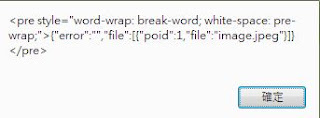
所以回傳回來後javascript接到就認為格式不正確。
主要原因出在ajaxfileupload.js 的一個判斷上
只要將原本的
此外,如果將Jquery更新到新的版本,
會因為新的Jquery沒有 handleError 的元件而使得ajaxfileupload.js出錯,
這時候可以在ajaxfileupload.js最後面加上的
在google有查到 不只是asp.net回傳 json有這樣的狀況,
有其他人是在FF(firefox)會遇到這樣的狀況,
都可以修改ajaxfileuplolad.js的JSON判斷來處理。
發現actionresult
return JSON時候,會出現下面的錯誤
SyntaxError: Unexpected token <
Retrun回來的JSON,不是單純的JSON資料而已
還被加上了<pre ......的資料

主要原因出在ajaxfileupload.js 的一個判斷上
 uploadHttpData: function(r, type) {
        var data = !type;
        data = type == "xml" || data ? r.responseXML : r.responseText;
        // If the type is "script", eval it in global context
        if (type == "script")
            jQuery.globalEval(data);
        // Get the JavaScript object, if JSON is used.
        if (type == "json")
            eval("data = " + data);
        // evaluate scripts within html
        if (type == "html")
            jQuery("<div>").html(data).evalScripts();

        return data;
    }
只要將原本的
      if (type == "json")
            eval("data = " + data);
 if (type == "json"){
            if (data.indexOf("<") >= 0) {
                data = jQuery.parseJSON(jQuery(data).text());
            }
            else {
                eval("data = " + data);  /*Bug  fixed by under */
            }
         }
此外,如果將Jquery更新到新的版本,
會因為新的Jquery沒有 handleError 的元件而使得ajaxfileupload.js出錯,
這時候可以在ajaxfileupload.js最後面加上的
 handleError: function(s, xhr, status, e) {
        // If a local callback was specified, fire it
        if (s.error) {
            s.error.call(s.context || window, xhr, status, e);
        }

        // Fire the global callback
        if (s.global) {
            (s.context ? jQuery(s.context) : jQuery.event).trigger("ajaxError", [xhr, s, e]);
        }
    }
在google有查到 不只是asp.net回傳 json有這樣的狀況,
有其他人是在FF(firefox)會遇到這樣的狀況,
都可以修改ajaxfileuplolad.js的JSON判斷來處理。
留言